Coming soon · in development
Private share links, built for teams
Upload a blurred screenshot and share a link that only the right people can open. It's optional, it starts private, and it never touches screenshots you don't choose to share.
Today, Screshot keeps every screenshot on your device. That won't change for anyone who doesn't use sharing.
Get early access
We'll invite your team when it's ready.
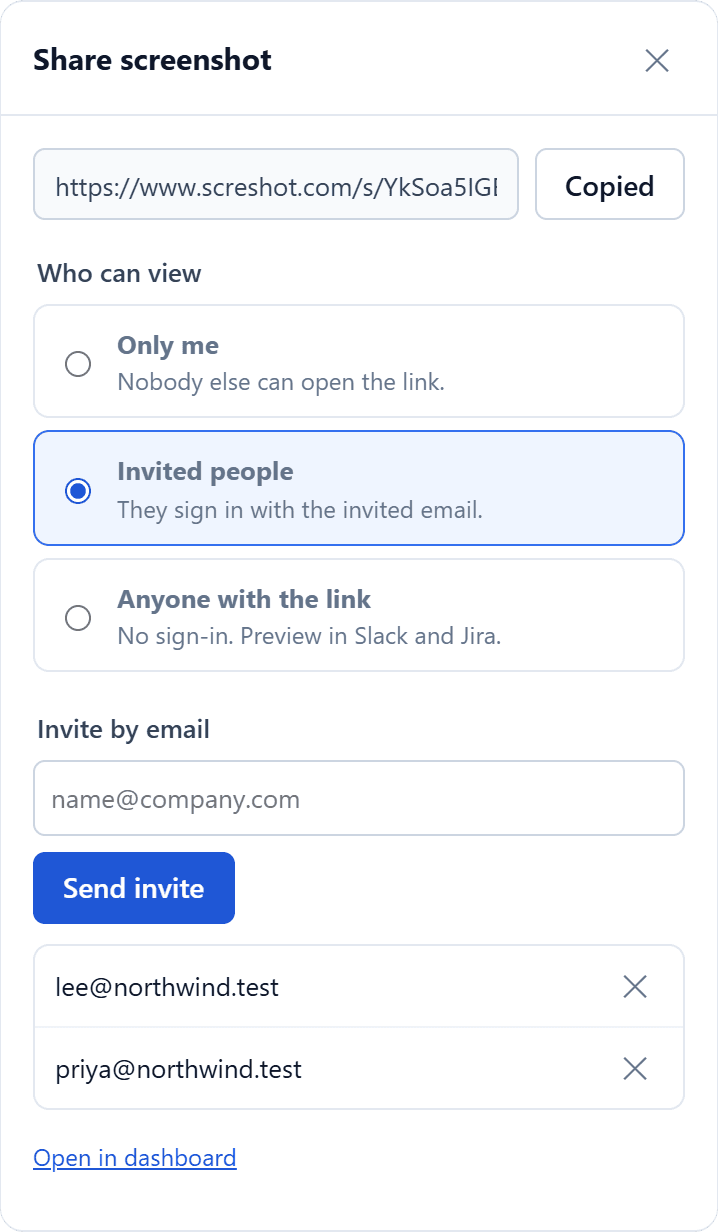
You choose who can open each link
Three levels, and every new link starts at the most private one.
Only me
The default for every new link. Nobody else can open it.
Invited people
Only the email addresses you invite, after they sign in with that address.
Anyone with the link
Only if you pick it, for screenshots with nothing sensitive in them.
What we are committing to
- Off until you click Share on a screenshot. Copy and download stay on your device
- Only the blurred, cropped image you see is uploaded, never the original capture
- Change who can view, revoke an invite or delete a screenshot at any time
- Shared pages hidden from search engines, and photo metadata removed
- Passwordless sign-in with your email, Google or Microsoft account
- No selling, no advertising, no training AI on your screenshots
The full list of safeguards is in our security overview. Before launch we will update our privacy policy with exactly what is stored and for how long.