Capture the area or the whole page
One click or Ctrl+Shift+S, then drag to keep only what matters. Or capture a long page as one image, without repeated sticky headers. Full-page captures can't be blurred yet.
Private Screenshot · Blur & Annotate · End-to-End Encrypted Sharing
Your screenshots stay on your device until you decide otherwise. Capture, blur and annotate in your browser. When you click Share, Screshot encrypts the screenshot on your device first and gives the key only to the people you choose. Not even Screshot can see it.
For Chrome on a computer
Used by 20,000+ people on the Chrome Web Store
20,000+
Chrome users
Free
To capture, blur and annotate, for any team size
5
Browser permissions, none with an install warning
0
Screenshots uploaded without your say-so
See it in 23 seconds
Capture and edit on your device, blur a customer’s details out of the image, and share by a link only the right people can open.
Blur sensitive data
A screenshot can carry more than you meant to share: a customer's email, a phone number, a colleague's name. Screshot puts blur next to the arrow and the box, so hiding them takes a second.
Hide it in one drag
Emails, names, internal URLs. Select the blur tool (Ctrl+Alt+B) and drag over them. Leave passwords and keys out of your selection.
Pixels replaced, not covered
The blur replaces the original pixels in the image. It is not a layer on top, so the image you copy, download or share doesn't contain the originals.
Blurred before it goes anywhere
Redaction happens on your computer, before the image reaches the clipboard, a file or a share link. What you copy, download or share from the editor is the edited image, not the original.
Product
One extension replaces the screenshot app, the image editor, the redaction step and the chat thread. Everything you share stays end-to-end encrypted.
One click or Ctrl+Shift+S, then drag to keep only what matters. Or capture a long page as one image, without repeated sticky headers. Full-page captures can't be blurred yet.
Hide emails, names and phone numbers in one drag in the editor. The original pixels are replaced, not covered.
Arrows, boxes, ellipses, highlighter, pen and text in any color, with undo and redo. Then copy it into your chat, ticket or email.
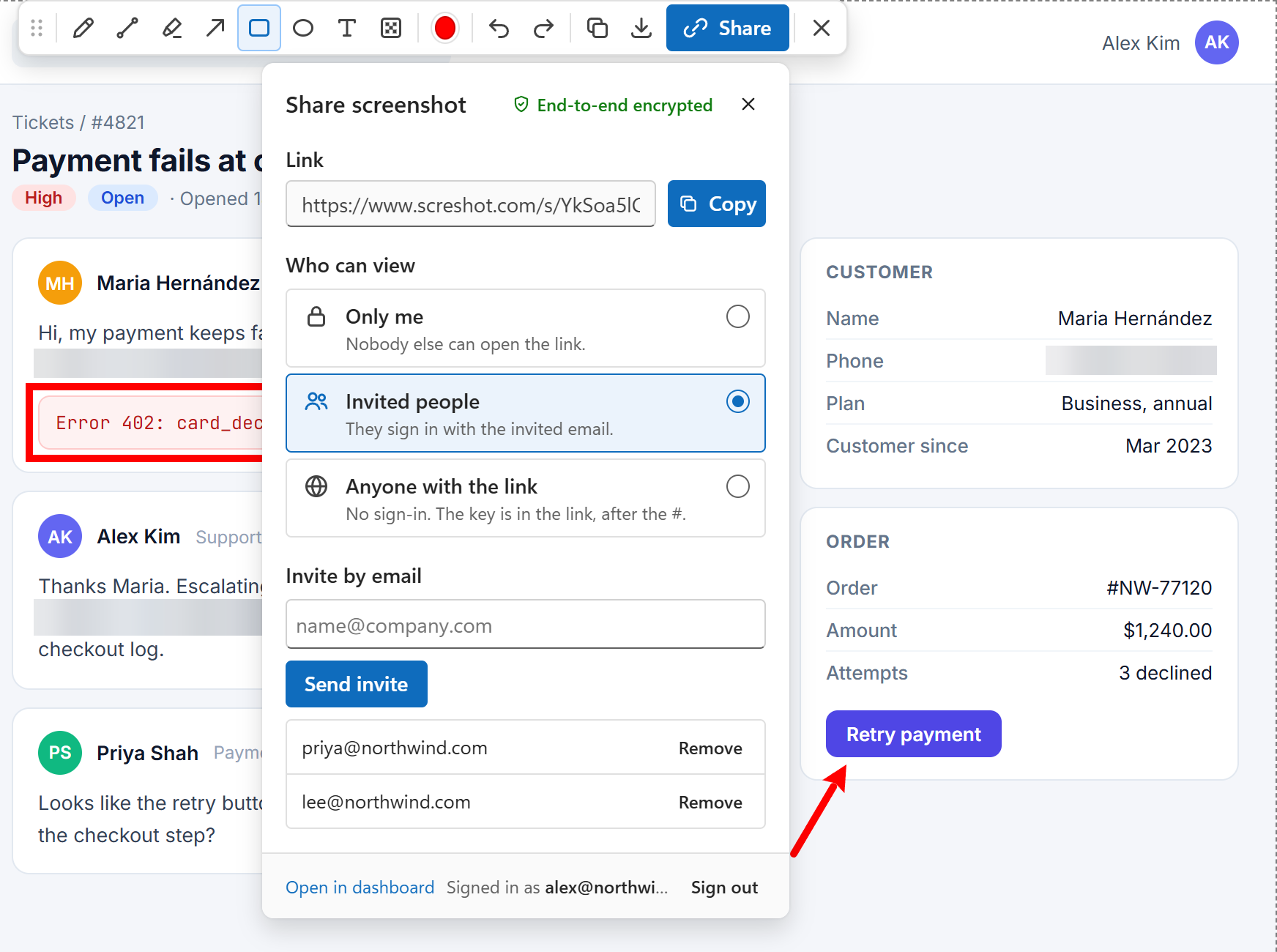
Click Share and the screenshot is encrypted on your computer first. Choose Only me, Invited people, a Workspace or Anyone with the link, and change it any time.
Comment, reply and @mention right next to the screenshot, live. Comments are end-to-end encrypted too, so only people who can open it can read them.
Invite teammates once and share with the whole team in one click. Owners and admins decide who's in; anyone who leaves loses access.
Privacy by design
Screshot takes private screenshots on your device. Nothing is uploaded until you choose to share, one screenshot at a time, and you decide who can see it.
Web page
the tab you capture
Screshot editor
inside your browser
You decide
clipboard, download or an encrypted link
Share by link, end-to-end encrypted: the screenshot you choose is encrypted in your browser before upload, and each link starts visible only to you. Screshot stores the encrypted file, never the key.
Use cases
Show customers exactly where to click, and blur other customers' data before a screenshot lands in a ticket or a shared link.
File bugs with an annotated, blurred screenshot pasted into your ticket, or an end-to-end encrypted link for the team. Need the whole page? Capture it as one image, shared as it is.
Mark up live pages for review without exporting to a separate design tool.
Document processes from internal systems while keeping account numbers and names out of the image.
For teams
Workspaces put your team in one place: share a screenshot with everyone in one click, and only they hold the keys. Free, with no seats to buy. IT can also install Screshot for everyone with the Chrome policies they already use.
Create a workspace
Name it after your team on screshot.com.
Invite your team
Colleagues with a Screshot account join when they accept.
Share with Workspace
Everyone in the team can open it. Nobody else can, Screshot included.
Talk about it
Encrypted comments, replies and @mentions on every screenshot.
A private screenshot stays on your device until you decide to share it. With Screshot, capturing, blurring, annotating, copying and downloading all happen in your browser, so the image does not leave your computer. If you share it, it is end-to-end encrypted on your device first and only the people you choose get the key. Anyone you share with can still capture their own screen, so share only with people you trust.
How to take a private screenshot →Only if you choose to, and then only encrypted. Screshot captures the tab you are looking at and opens it in an editor inside your browser, so capturing, blurring, copying and downloading upload nothing. When you click Share, the screenshot is end-to-end encrypted on your device before upload: Screshot stores the image encrypted and never has the key, and every new link is visible only to you until you change it. There is no tracking inside the extension.
Read the security overview →The blur replaces the original pixels in the image; it is not a layer on top. The image you copy, download or share doesn't contain the original pixels under the blurred area. Coarse colors stay in the image, so short text, such as a few digits, can sometimes be matched by guessing. Leave passwords, keys and card numbers out of your selection instead of blurring them. Full-page captures can't be blurred yet.
Yes. Click Share in the editor and Screshot encrypts the screenshot on your device, uploads the encrypted file and gives you a link. Every link starts as Only me. Switch it to Invited people (each person you invite gets their own copy of the key), Workspace (everyone in your team gets one) or Anyone with the link (the key travels in the link after the #, which browsers never send to a server, so anyone who gets the link can open it). You can change who can view, remove someone or delete the screenshot at any time, and the change applies the next time the link is opened.
How the encryption works →Five, and none of them shows a warning when you install. "activeTab" lets Screshot capture the tab in front of you, only at the moment you click the icon or use a shortcut. "scripting" lets it scroll that same tab during a full-page capture and then put it back exactly as it was. "contextMenus" adds the right-click menu on the Screshot icon. "storage" keeps your sign-in on this device, and "identity" opens Google sign-in when you choose to share. Screshot cannot read your browsing history or see tabs you did not capture.
Not to capture, blur, annotate, copy or download. Those work right after you install, with no sign-up. To share by link, you sign in with your Google account, in the extension or on screshot.com (signing in to one signs in the other), and turn on encryption once with a passkey and a recovery code.
Yes. Screshot is a standard Chrome Web Store extension, so it can be force-installed and pinned for any group of users from the Google Admin console, Microsoft Intune or Windows Group Policy. Capture and blur need no accounts or licenses, and sharing by link stays off for each person until they sign in and turn on encryption.
See the deployment guide →Capturing, blurring, annotating, copying and downloading are free for individuals and organizations of any size, and we are committed to keeping them free. Sharing by link currently includes 1 GB of encrypted storage per account at no charge. Teams share through workspaces at no extra cost.
Screshot for teams →Screshot is a private screenshot tool for Chrome. You capture, blur and annotate on your device, free and with no account. When you need a link, you share it end-to-end encrypted, so only the people you choose can open it. Not even Screshot can see the image.
Visible area: click the Screshot icon or press Ctrl+Shift+S. Full page: right-click the icon and choose "Capture full page", or press Alt+Shift+S. Screshot scrolls the page for you, stitches it into one image and opens it in a new tab where you can scroll through it, copy it, download it or share it as it is (full-page captures can't be blurred yet). For visible-area captures, the editor lets you drag to keep only part of the image, or double-click to select all of it.
Crop, blur (to hide emails or names), pencil, straight line, arrow, rectangle, ellipse, highlighter and text, with a color picker and undo/redo. Blur replaces the original pixels; it doesn't cover them.
Click Download to save a PNG to your computer, or Copy to put the image on your clipboard so you can paste it straight into your chat, ticket, email or document. To share a link instead, click Share: the screenshot is end-to-end encrypted before it is uploaded.
It works on almost all websites. Chrome does not let extensions capture its own pages, such as chrome:// settings and the Chrome Web Store, so the icon will not work there. This is a browser rule, not a bug.
First make sure Screshot is up to date and refresh the page you are capturing. If the problem continues, or you want to suggest a feature, send us a message from the contact page. We read every message.
Contact us →Capture, blur and annotate for free, then share privately with one person or your whole team. Installs in seconds.